



41% of U.S. contractors buy materials right after winning a contract, according to a survey by the Associated General Contractors of America and Sage 2026 Construction Hiring and Business Outlook. Another 10% stock up before they’ve even won a contract to avoid supply delays,
Those materials stay in storage until a crew asks for them. If the employees place a vague or incorrect request, the crew gets wrong items and stays idle until the right ones arrive.
A material requisition form avoids this by ensuring everyone uses the same format to ask for materials.
In this guide, you’ll find:
- The fields to include in your form
- Tips for creating and using it effectively
- A template you can copy or modify
- How a material requisition differs from a purchase requisition and a purchase order
- The mistakes that slow requests down
- How going digital can speed up approvals and tracking
Stop chasing material requests.
Try doForms for free
What Should A Material Requisition Form Include?
Most forms include four groups of fields, each providing specific information to the warehouse or purchasing team.
Request Details
- Requisition number
- Date of request
- Requester name, role and phone number
- Project name, job number or work order number
- Cost code or department
Item Details
- Item description, including size, grade or specification
- Manufacturer or part number, if a specific product is required
- Quantity and unit of measure: boxes, linear foot, etc.
- Reason or intended use
Delivery Details
- Needed-by date and time
- Delivery location on site or pickup point
- Receiving person
Approval & Fulfillment
- Approver name, signature and date
- Status for each item: approved, rejected, partially filled or backordered
- Quantity issued and date issued
- Name and signature of the person who received the materials
If your industry must follow specific compliance requirements, you can add an extra field to your form. For example:
- For hazardous materials: confirmation that a Safety Data Sheet is on file
- For food and pharmaceutical manufacturing: lot or batch numbers in case of recalls
- For healthcare and labs: expiration dates
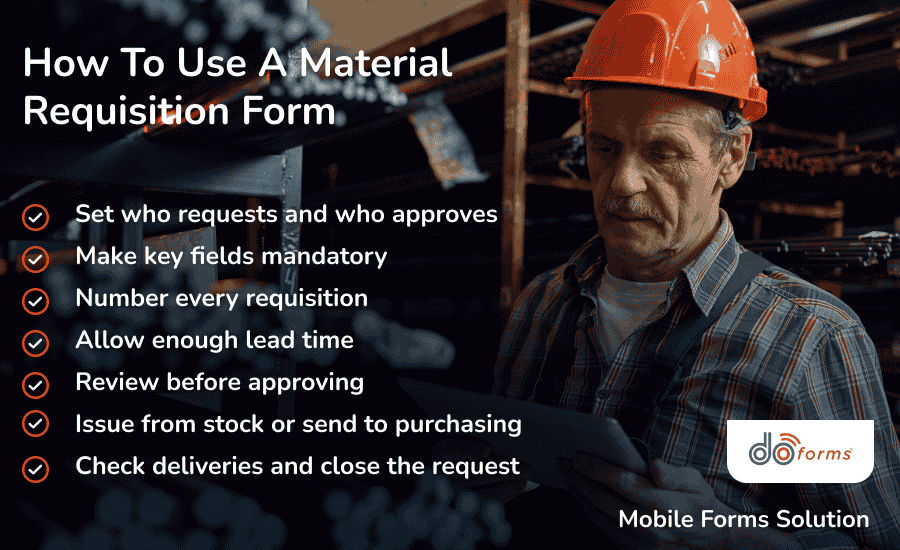
How To Create & Use A Material Requisition Form
A few simple tips can help fill out the document quickly and speed up the requisition process.
1. Decide Who Requests & Who Approves
Choose the roles that can submit and approve requests. For example, a superintendent might sign off on routine requests under a set amount, while the larger amounts should go to the project manager.
If you’re running a smaller business, make sure that the requester and the approver are two different people, so every request gets a second check.
2. Build The Form Fields
Set mandatory fields like unit of measure, needed-by date and delivery location. Mandatory fields stop incomplete requests from reaching the warehouse, so staff don’t have to call the crew back for missing details.
3. Include A Number For Every Requisition
Assign each request a unique number. This way, you can link it to any purchase order or delivery.
4. Ensure There’s Enough Lead Time
Set a minimum notice period for stocked items, such as 48 hours. Ask crews to flag long-lead items much earlier since they may need to be ordered from a supplier.
5. Review & Approve
Compare the requested quantities with the project plans and check the cost against the budget for that job or cost code. Send unclear requests back to the requester with a note explaining what needs to be fixed.
6. Fulfill From Stock Or Send To Purchasing
The warehouse should issue the items that are available. If something is not in stock, they should pass the request to the purchasing department and keep the form open until the new items arrive.
7. Receive & Close The Request
Check the materials against the request and sign the form. Close the requisition when every item has been received or cancelled.
Material Requisition Form Template
Below is a blank material requisition form template. You can use it as it is or add and remove fields to create your own printed or digital version.

Material Requisition vs. Purchase Requisition vs. Purchase Order
Although these three documents may sound similar, each has a different purpose and is handled by a different department.
Material Requisition
You can use this form to request materials needed for a specific job from a warehouse, storeroom or yard. Because they are typically available, there’s no need to buy them first.
Purchase Requisition
A material requisition can turn into a purchase requisition when the company doesn’t have the requested item in stock. In this case, purchasing or finance receives the request, checks the budget and picks a supplier from an approved vendor list.
Purchase Order
A purchase order goes from your company to the supplier after approval. It confirms the items, quantities, agreed prices, delivery dates and how payment will be made. For the rest of the cycle, read our guide to the purchase order process.
Track every request from the warehouse shelf to purchasing.
Try doForms for free
Common Material Requisition Mistakes To Avoid
Most delays on material requests come from a handful of gaps that can be avoided.
Vague Item Descriptions
If you write down “wire” or “fittings,” the warehouse will not know what you really need.
Include the item name, size, type and specification. Add a part number when the job requires a specific product.
Mixed-Up Units Of Measure
A request for 10 boxes of screws can easily be mistaken for 10 screws on a rushed form.
Make the unit of measure a required field, so the person filling it out has to choose a unit, whether that’s a box, pallet or another option, before submitting.
Leaving Out The Due Date
Without a date, the warehouse employees don’t know if your request is urgent.
Ensure requesters give a date and time to receive what they need, and approvers flag the items that are needed sooner than usual.
Approvals Given Over The Phone
A verbal “Go ahead” leaves no trace of who requested and who approved taking an item out of the storage facility or warehouse.
Don’t release any item from storage until a person signs off.
Duplicate Requests
When crew members think they’ve lost the request, they often generate a second document for the same items. Ordering the same materials twice means your inventory counts stop matching what’s on the shelf.
Track each request by its number and status, so the crew can follow up on the original instead of submitting a new one.
Requests Left Open
Unrecorded partial deliveries mean no one knows what’s still missing. Note every partial delivery and close the request only when it’s complete.

How Digital Requests Improve Approvals & Tracking
A paper request can sit on the wrong desk for days, and an emailed one can disappear under dozens of other messages. Going digital avoids both problems.
With a digital form, the crew can ask for materials from the job site using a phone or tablet.
They can also attach a photo of the work area or of an old delivery label showing exactly what’s needed. Each request carries a GPS location and timestamp.
The form goes straight to the right approver, who can review and sign it without returning to the office. The crew, the approver and the warehouse can all check whether items are approved, partly issued or backordered, without having to call anyone.
Every request is saved, so you can look up an old requisition by job number or date. Reports also show which jobs use the most materials and where approvals slow down.
Improve Your Material Requisition Process With doForms
As a mobile form solution, doForms allows you to build a material requisition form with a drag-and-drop mobile form builder, starting from a ready sample.
Alternatively, you can create one from scratch following the template we suggested and customize it based on your business needs.
Once the form is ready, your crew can fill it out on a smartphone, tablet or laptop, even when they don’t have an internet connection.
The plans we offer follow how far you want to take the process.
- Standard allows you to create a digital form.
- Advanced automates the workflow around it, such as dispatching and routing requests.
- Premium connects the form to the systems you already use, so approved requests don’t have to be retyped into purchasing or accounting software.
Not sure if doForms is the solution you need? A 30-day free trial lets your team test the form on an active job first before you commit.