




Digital Inspection Forms: Key Takeaways
- Digital inspection forms replace paper checklists with mobile tools that capture data in real time
- They reduce errors, save time and generate reports automatically
- Inspection forms work across industries like construction, healthcare, retail and hospitality
In fiscal year 2025, the Occupational Safety and Health Administration conducted 30,000 workplace inspections.
Add countless internal safety checks, vehicle inspections and quality audits, and think of the piles of paper you’ll need. Maybe it’s time you went digital?
In this guide we’ll break down:
- How digital inspections work
- The key benefits of switching from paper to digital
- Common use cases across industries
- How digital forms compare to paper
- What to include when building an inspection form
- How digital forms improve reporting and compliance
Looking to digitize your inspection forms?
Try doForms for free
How Digital Inspection Forms Work
Implementing digital inspection forms in your business is easy.
Most companies get started in one of two ways.
- You can take an existing paper document, whether it’s a checklist, a safety audit, a vehicle inspection, or a facility walkthrough, and rebuild it as a mobile form.
- Or, if you don’t have a paper version to start from, you can build a new form from the ground up.
To create an inspection form, you typically use a drag-and-drop mobile form builder, adding fields like checkboxes, dropdowns and required-answer prompts, replacing handwritten notes and making sure important data cannot be missed.
Then inspection forms can be deployed to a smartphone, tablet or laptop. This allows anyone on your team to see, edit and share them with a single click regardless of their location, right where the work’s happening.
Depending on the solution chosen, team members can attach photos of a damaged pipe, capture a GPS location or collect an electronic signature on the spot without waiting to get back to the office.
When the mobile inspection form is submitted, the data syncs to the cloud immediately, so managers have the information in real time.
If the team members were working offline, the sync happens as soon as the device reconnects.
Benefits Of Using Digital Inspection Forms
Shifting from paper to digital forms is convenient, but it also makes data collection faster and more accurate.
Improved Accuracy
Having standardized fields means every inspector answers the same questions in the same format, reducing the probability that reports will be incomplete or inconsistent.
Speed & Faster Turnaround
Data can be used the moment it’s collected and shared, reaching the right people or departments the same day.
Accountability & Audit Trails
Submissions are timestamped, geotagged and tied to the inspector who filled them out. That means you always know who checked what and when.
Plus, completed inspections are stored in one organized, searchable system so you’re always audit-ready.
Common Use Cases For Digital Inspection Forms
Inspection forms can be used across various industries to streamline and automate workflows.
Construction & Field Services
Your construction site safety checks, vehicle inspections, equipment maintenance logs and job completion reports will be able to move faster when your crew can fill them out on a phone instead of carrying a clipboard through mud.
Healthcare
Digital forms give administrators an accurate and traceable record in line with the Health Insurance Portability and Accountability Act requirements.
You can use them for HIPAA-compliant checklists, head-to-toe assessments and annual physical exams.
Retail & Hospitality
Many retailers and hotel groups use digital forms for store walkthroughs, food safety checks, restaurant operation checks, and maintenance rounds.
If they have businesses in multiple locations, they can compare results from one dashboard.
Fleet & Vehicle Inspections
Trailer inspections, CDL pre-trip checks and commercial vehicle inspections are among the most common mobile forms use cases.
Easy to use and share, they allow drivers to fill out forms in minutes, using their phones, before, during or after travel.
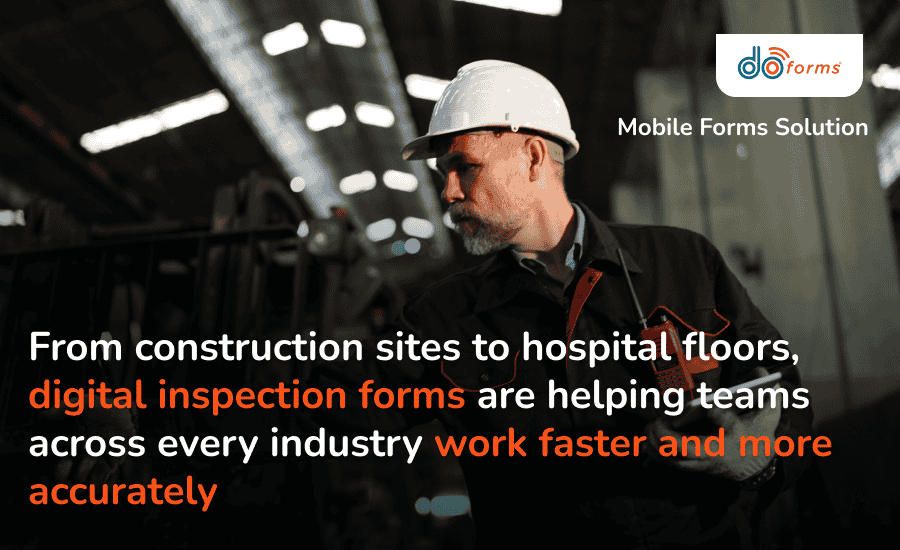
Digital inspection forms fit the way your team already works, no matter the industry
Digital Inspection Forms vs. Paper Inspection Forms
Let’s take a closer look at what actually changes when you make the switch.
Data Entry
Paper forms use handwritten notes after an event occurs, which causes delays and leaves room for error.
Digital forms capture data the moment it’s collected, allowing immediate intervention or corrective actions.
Legibility
Rushed handwriting on a paper form can be hard to read. Sometimes it’s misread entirely.
Digital forms use standardized fields so every entry is clear and accurate.
Photos & Signatures
If you want to attach photos and signatures to a paper document, you need to do it separately using more sheets.
With an online inspection form, you can add them directly to illustrate a specific issue or step that has been taken.
Reporting
Paper checklists must be manually compiled into a report, which takes time and may lead to lost details.
Using digital software, you can generate reports automatically the moment the forms are submitted.
Storage
Paper records are physical, which means they can be misplaced, damaged, or hard to find later.
An inspection form app allows you to store your forms in the cloud, so anything you need is searchable in seconds.
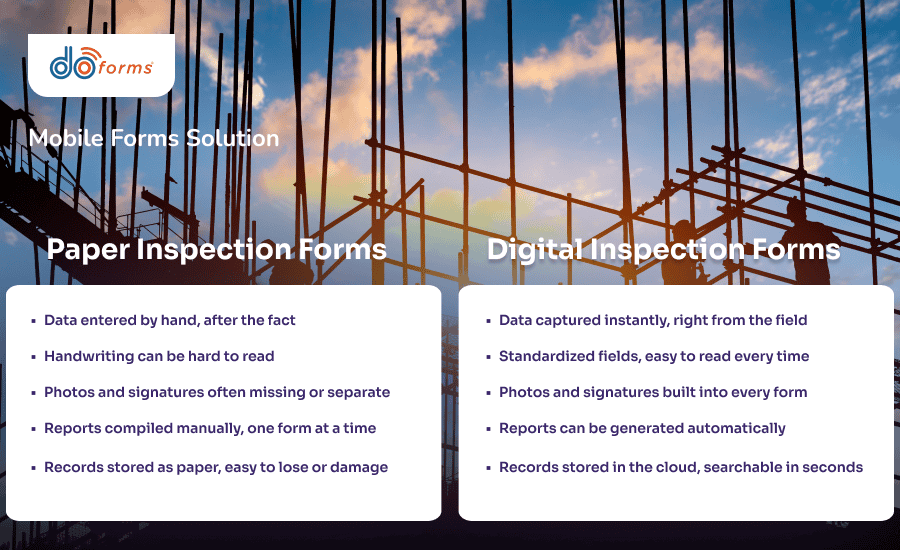
The difference between paper and digital inspection forms comes down to speed, accuracy and how easy you can find your records later
What To Include In A Digital Inspection Form
Although it may differ from business to business, a solid inspection form needs a few mandatory fields:
- Date
- Time
- Location
- Inspector name
From there, add the specific checklist items relevant to your industry and what’s being inspected, whether that’s equipment condition, safety hazards, or compliance points tied to a specific standard.
Beyond the checklist itself, you can build fields for photo evidence, inspector’s signature and other details.
How Digital Inspection Forms Improve Reporting & Compliance
In addition to collecting data faster, inspection form software helps you pass information to relevant departments that can immediately act upon it.
It also helps managers spot trends. For example, they might reveal that a specific type of equipment keeps failing the same checks.
Digitizing your inspection forms affects compliance too. With everything documented and timestamped, you’ve got a record if a regulator, insurer, or client asks for proof that inspections happened on schedule.
How doForms Helps Teams Create Digital Inspection Forms
doForms is a mobile forms solution that can be used across industries, from construction and healthcare to retail, hospitality and field services.
It allows your teams to work offline, meaning inspectors can complete forms even without internet connection. Once they’re back online, the data is synced and ready to use.
With a focus on security, doForms includes HIPAA-compliant options, multi-factor authentication and encrypted data storage so you have peace of mind that sensitive information is always protected.
New customers get a 30-day free trial so they can determine whether doForms is the right solution for their needs.
Need inspection form software?
Try doForms for free
Digital Inspection Forms: FAQs
What are the benefits of digital inspection forms over paper?
Digital forms reduce errors, speed up reporting and create a reliable audit trail. They also cut down on paperwork printing and storage.
What should be included in an inspection form?
At a minimum, include the date, time, location, and inspector name along with checklist items specific to what’s being inspected.
Can my team use digital inspection forms offline?
Yes. Inspection forms apps like doForms can work even when you’re not connected to the internet. The data is saved locally on the device and syncs to the cloud automatically as soon as the device has a signal.
Ready to switch to digital inspection forms?
Book a doForms demo